
Google is marking the International Day of Persons with Disabilities with a broad set of accessibility upgrades rolling out as part of Android 16. The update focuses on improving visual comfort, communication clarity, and hands-free control. The goal is to reduce friction for anyone who relies on assistive tools, and Google is weaving these additions directly into the core Android experience.
A More Consistent Dark Theme
The expanded dark theme option addresses a long-running annoyance: apps that refuse to follow the system’s dark setting. Android 16 now applies a unified darkened interface across most apps, including those without built-in dark mode support. This update offers a steadier viewing experience for people with low vision or sensitivity to bright screens, reducing the jarring shift from a dim interface to a bright one.
Expressive Captions Adds Emotional Context
Google’s Expressive Captions system uses AI to provide clearer context around audio content by tagging tone, volume, and environmental cues. Android 16 extends this with emotion detection, labeling captions with signals such as “[joy]” or “[sadness]” to help users better understand a speaker’s intent.
The company is also bringing parts of this experience to YouTube videos across all devices. English-language uploads from October onward gain richer captions that call out the intensity of speech, human sounds like sighs and gasps, and environmental noise. It’s a small but helpful upgrade for viewers who rely on captioning to follow content more naturally.
AutoClick Reduces Physical Strain for Mouse Users
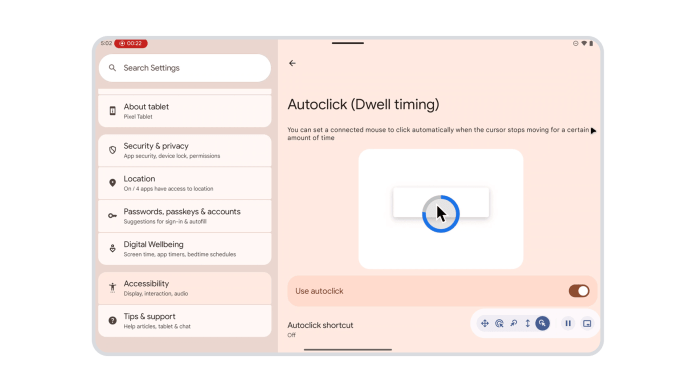
For users who connect a mouse and find traditional clicking uncomfortable or painful, AutoClick receives a more customizable dwell-based workflow. You can set the cursor to click automatically after pausing for a chosen amount of time, easing repetitive strain. Android now lets users adjust the click type as well, covering left-click, right-click, double-click, long-press, scroll, and drag.
TalkBack Gains Easier Voice Dictation
Android’s TalkBack screen reader is adding a new shortcut for voice dictation. A simple two-finger double-tap will soon activate voice input in Gboard, creating a smoother handoff between navigating with TalkBack and entering text.
Guided Frame Gets a Boost from Gemini
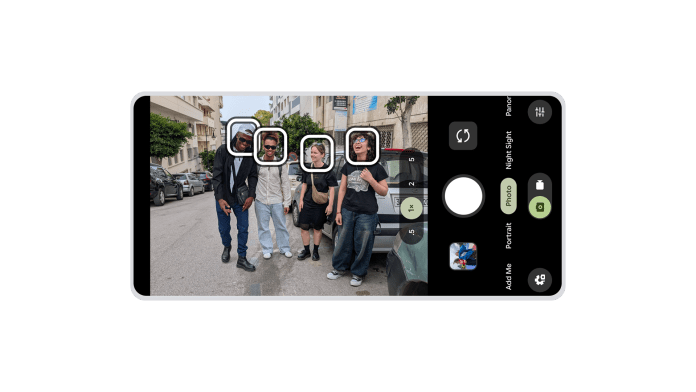
Guided Frame, found in the Pixel camera app, supports blind and low-vision users who want to take photos with more confidence. Now powered by Google’s Gemini models, it delivers richer scene descriptions. Instead of a basic confirmation of a face in the frame, users might hear something like, “One girl with a yellow T-shirt sits on the sofa and looks at the dog.” It’s a more detailed cue system designed to help users frame their shots with greater precision.
Voice Access Becomes Fully Hands-Free
Voice Access already lets users control their phone through spoken commands, and Android is removing one of the last setup barriers. Once enabled, it can be launched entirely hands-free by saying, “Hey Google, start Voice Access.” The system now supports Japanese and better interprets voice typing commands, punctuation, and varied accents. It can toggle settings like Wi-Fi and Bluetooth through voice alone.
Easier Pairing for Hearing Aids with Fast Pair
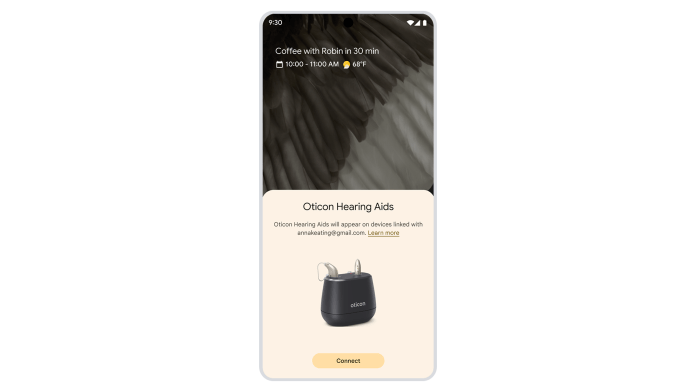
Fast Pair is extending to Bluetooth LE Audio-enabled hearing aids, reducing the setup to a single tap on compatible Android devices. Support begins with Demant hearing aids, with Starkey integration scheduled for early 2026. The streamlined pairing flow aims to make hearing-aid connectivity as quick and predictable as pairing earbuds.