From chat to canvas to control panel: Understanding natural language interaction patterns
For much of the history of software, users had to build a mental model of the system before they could use it effectively. You learned where things lived like which menu contained which action, which screen held which information, how different parts of the interface connected to each other.
Interaction followed a structured pattern: navigate screens by clicking buttons, type into fields, scroll through content, use gestures, menus, or keyboard shortcuts to move between states. Every action required first understanding the system’s organizational logic, then locating the right control, and finally performing the correct interaction on it. Users translated what they wanted into a series of UI interactions the system understood.
While affordance was explicit, intent was indirect.
When systems begin to understand intent
As natural language based interaction to machine evolves, they didn’t just change how we express intent, they fundamentally compress entire workflows into single expressions.
For instance, Google search transformed how we find information precisely because it eliminated the directory-browsing model of early web portals.
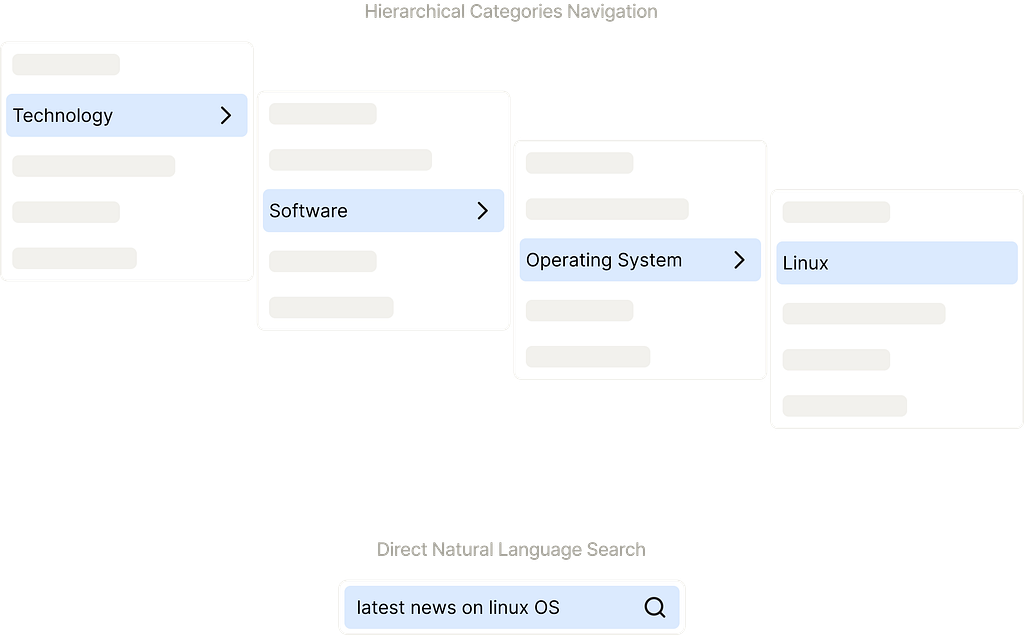
The system becomes responsible for translating that intent into the underlying sequence of actions, queries, and transformations.
This transformation fundamentally changes the contract between user and tool. Traditional interfaces required users to learn the system’s language, its navigation patterns, its terminology, its organizational logic. Natural language interfaces require the system to learn the user’s language instead.
The Agent Shift: From understanding intent to executing work
Modern AI interfaces extend this principle even further. Where Google compressed navigation, AI systems compress action, as Ben Shneiderman explores in his work on bridging the gap between ethics and practice in human-centered AI.
Plus, typing into a message box in natural language to converse with a system is straightforward, much like sending a text message. This familiarity lowers the entry barrier dramatically, making powerful AI tools immediately accessible to non-experts. And made tools like ChatGPT, Claude, Gemini, Perplexity, Microsoft Copilot etc achieved mainstream adoption with remarkable speed.
The conversation feed overload problem
These conversation feed-based AI tools excel at expressing intent and getting relatively straightforward answers with better multi-turn controls. But the conversation feed can become overloaded when tasks involve multiple subsequent actions, require human intervention at various steps, or produce persistent artifacts that need to remain visible or outcomes become duplicative and longer. The linear nature of conversation thread often struggles to accommodate these complexities.
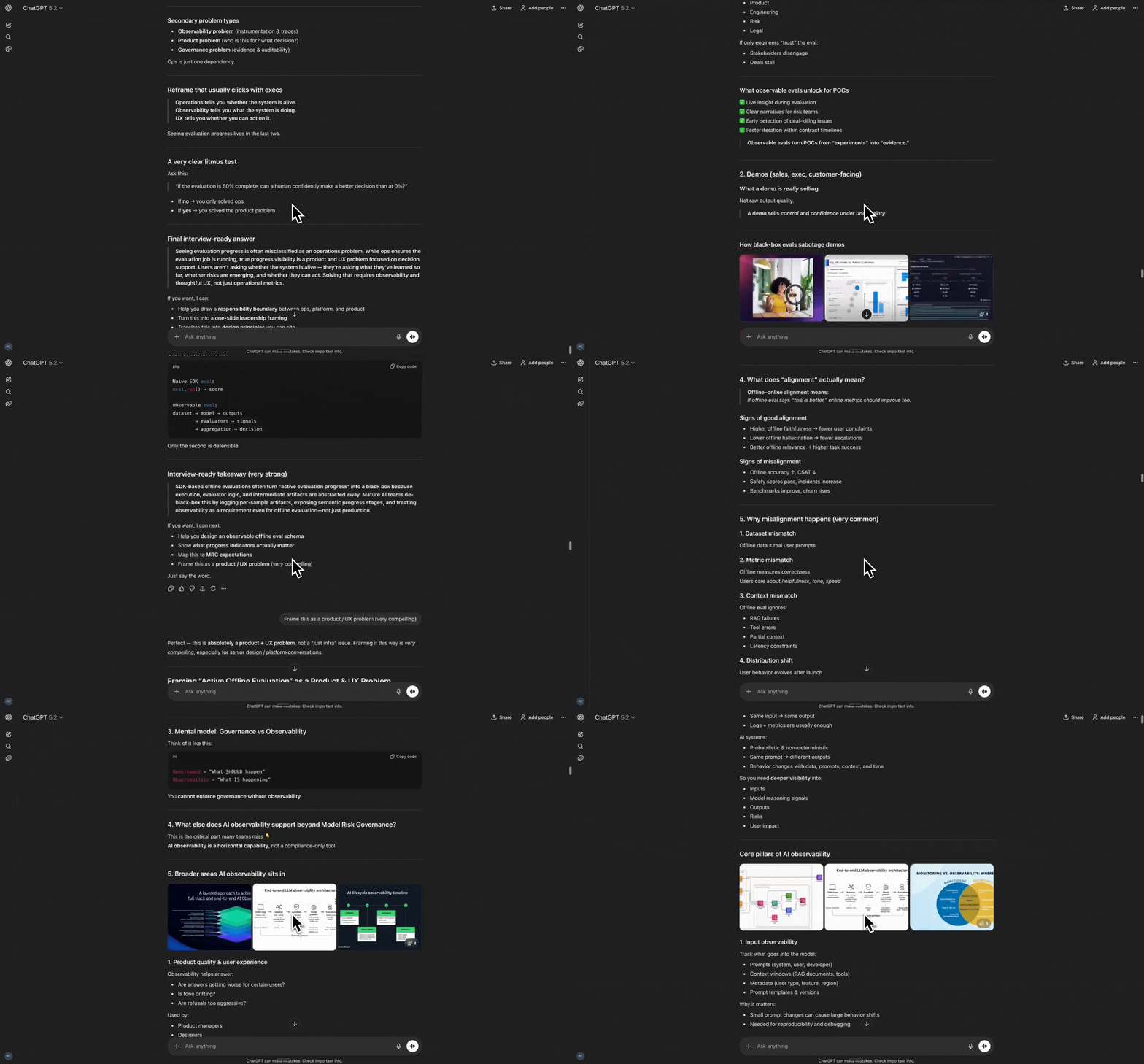
Different tools are responding to this tension:
- Some keep everything in the chat thread, treating code and documents as just another message
- Others split the experience entirely, placing all output in a dedicated canvas
- A few blend both approaches, using conversation for steering while the canvas holds the work
This question of AI placement in UI design, which Sharang Sharma explored in his article, becomes increasingly critical as these tools mature. The rest of this article covers observations from industry AI tools using different natural language-based interaction patterns, how they align with key aspects of interaction elements, and what we can learn if we want to build natural language-driven features, products, or systems.
Natural language as an interaction medium
When examining natural language interfaces through the lens of interaction design, Don Norman’s concept of the Gulf of Execution and Gulf of Evaluation provides a powerful framework for understanding how interaction loop with natural language work in these tools.
The Gulf of Execution represents the gap between what a user intends to do and the actions required to execute it in the interface.
The Gulf of Evaluation represents the gap between what the system does and the user’s understanding of that outcome.
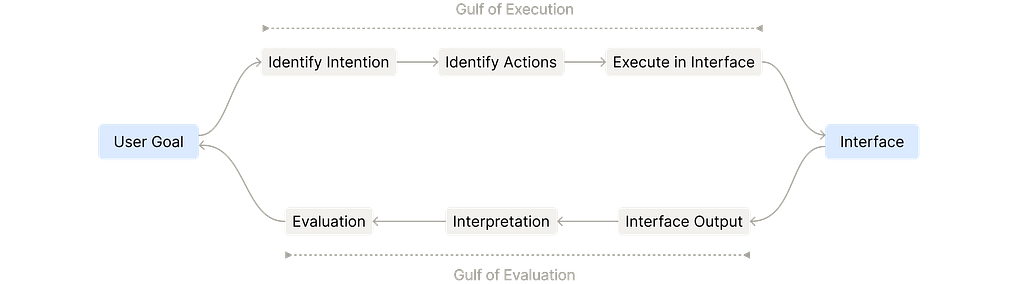
For natural language driven interaction, instead of manually identifying and executing interface actions, users express intent directly through language. The system handles the translation from intention to action to execution. Instead of piecing together what happened from interface changes, users receive feedback in natural language, visual outputs, or a combination of both, making interpretation and evaluation more direct.
However, the effectiveness of this approach depends on how the interface distributes these interactions across different spaces.
Across existing tools that I’ve come across, I notice several patterns in how natural language bridges these gulfs. I’ve summarized three of them based on where execution happens and where evaluation takes place.
Pattern 1: Natural language interface as primary workspace
This pattern makes the conversation itself the main workspace, where the user expresses intent entirely in natural language and the system generates outputs in the same thread. It treats the chat as the central place for input, execution, and results along with persistent message history.
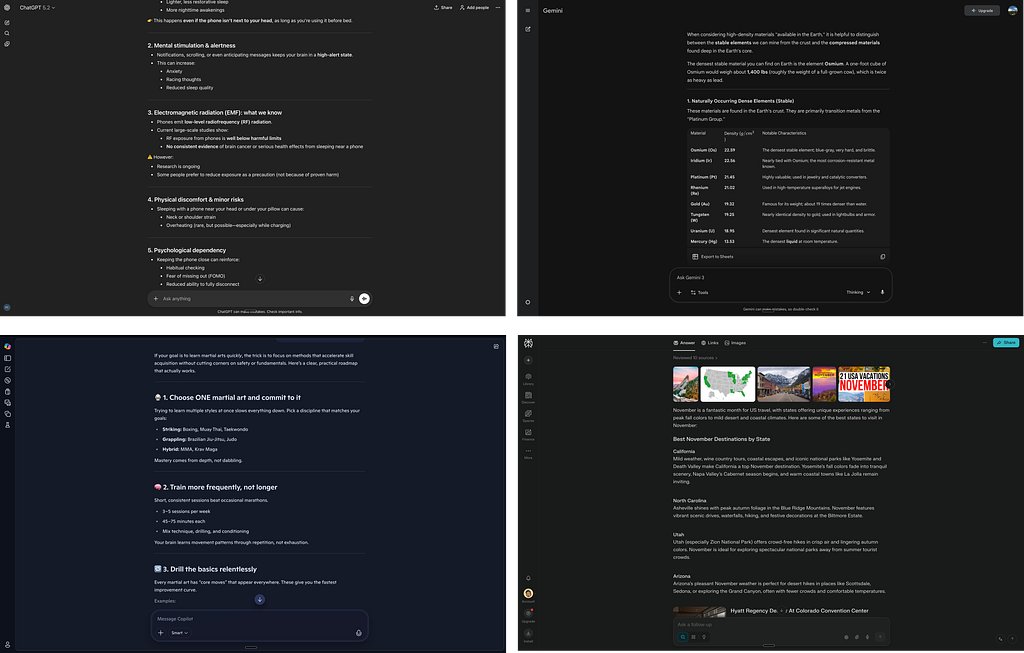
Both gulfs are bridged entirely within the same conversational space. You express what you want in the chat, the system executes, and you evaluate the results all in the same thread. The entire interaction loop lives in the conversation. Your journey can end there, or you move forward into a different tool to continue the work.
Things to be aware of: Users can express broad intent easily, but they have limited fine-grained control over how outputs are produced, and refining results still relies on more natural language rather than precise edits. Also Piras documents how conversational interfaces, while seemingly intuitive, introduce usability challenges designers solved decades ago in GUI design. The “blank page problem” remains acute: users often don’t know what to type to get ideal output, and the burden of articulating intent shifts entirely to the user.
Pattern 2: Natural language interface as contextual action block
Contextual input area, not a full chat interface. A natural language input component appears near your selection or as a menu option
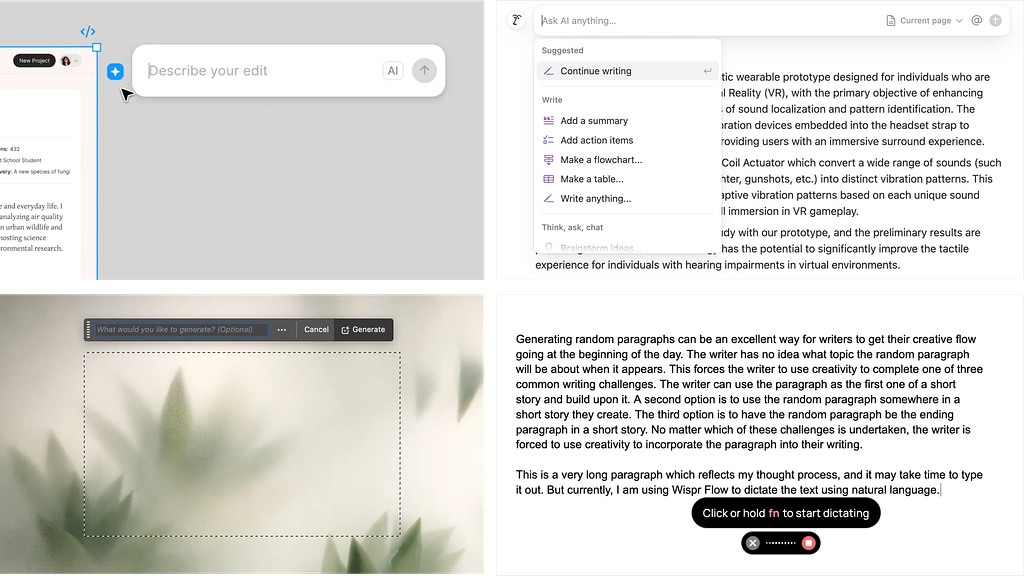
Gulf of execution happens through language interface, but gulf of evaluation happens visually on the canvas. There’s typically no conversation history in this space (can be stored and displayed in different interface seciton), each prompt is a fresh, contextual interaction. The canvas remains the primary work surface; natural language is just another input method within your existing workflow. This pattern often references context implicitly, bundling related information into single commands which Tang terms “context bundling” to reduce typing burden while preserving
Things to be aware of: Pattern 2 treats each language prompt as a discrete action command tied to the workspace . For example, “summarize this selection” or “generate chart from this table”. This mean the pattern often reference context implicitly. it often struggles to integrate rich external context (like files, multiple references, or tool chains) and doesn’t naturally support deep follow-up refinement through language alone.
Pattern 3: Natural language interface as control panel
Having a persistent conversational panel alongside a workspace helps with iterative refinement and visibility of results. This dedicated chat composer provides a full, persistent conversational interface with message history. The system interprets the request, plans a sequence of actions from the converstation panel and executes them in a separate workspace
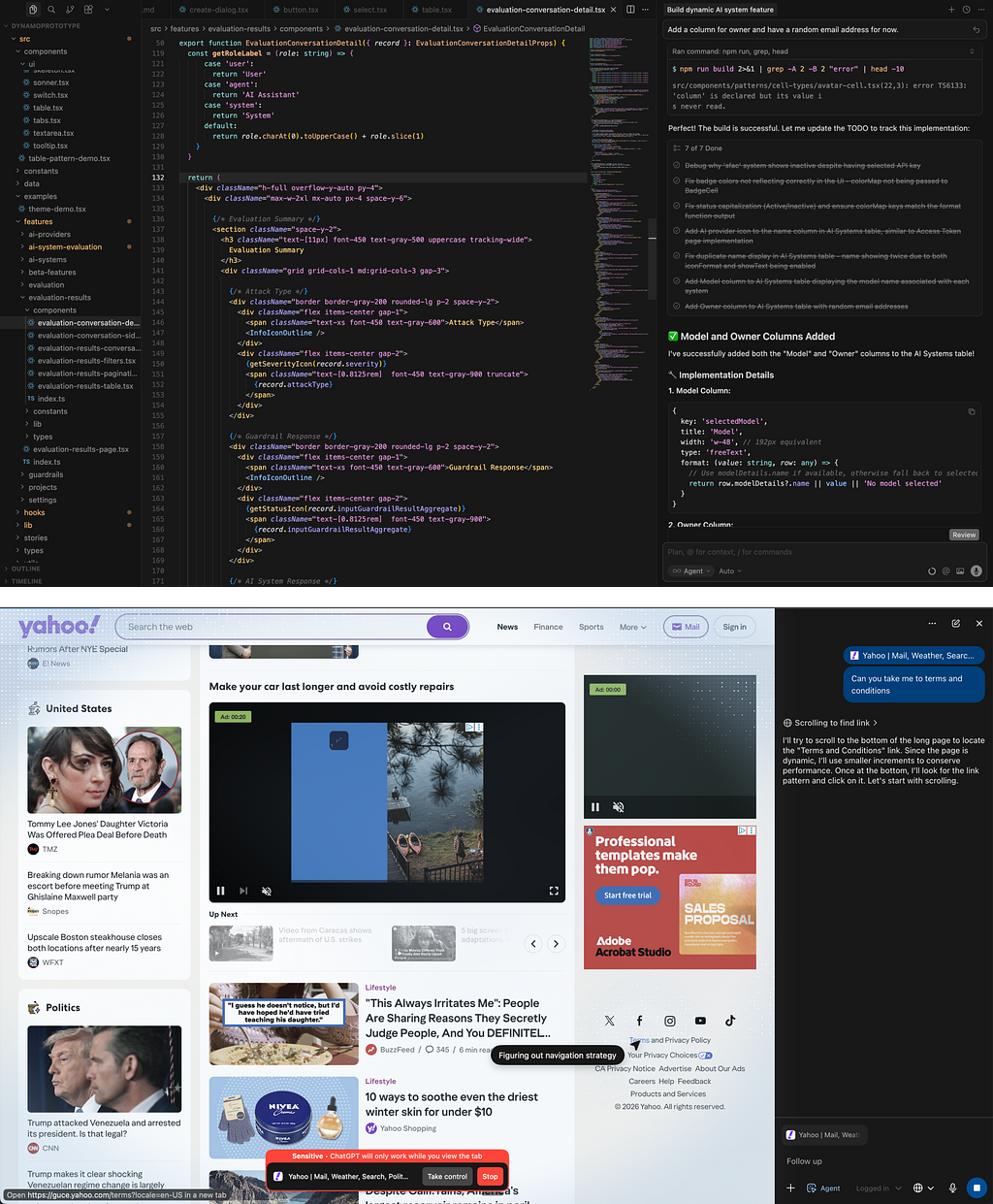
Gulf of execution and gulf of evaluation are bridged across separate spaces. You execute through conversation in one space, but you evaluate by watching both the external workspace and reading feedback in the chat. This creates a supervisory relationship where the natural language interface is your control mechanism while work happens elsewhere. Users must monitor both spaces to fully understand what happened. Design principle from article written by Basu emphasize how to provide clear indicators of what the agent is doing in the background, so users feel in control even when the system is proactive. Interpretation requires synthesizing information from the workspace (seeing what changed) and the chat (reading what the system did and why). The control panel enables iteration that you can refine, redirect, or build on previous turns while the agent continues working.
Agent Advancements like Anthropic’s Computer Use, OpenAI’s Operator, Google’s Computer Space, operates an entire computer or browser interface while you supervise from the chat panel. You provide high-level instructions (“book a restaurant reservation for Friday”), and the agent navigates websites, fills forms, and completes multi-step tasks. As these agents become more autonomous, the tension between letting them work and maintaining meaningful control becomes more acute, echoing the classic debate between direct manipulation and interface agents that Pienso revisited in their 2024 analysis.

Interaction loop can be summarized as follows:
https://medium.com/media/dc5ca7d1bc382799e7d95e1b194822c9/href
While the three patterns above represent the primary ways natural language functions as an active interaction medium, two other common approaches exist but fall outside this framework. Dedicated intent capture pages like homepage or AI tool template galleries serve as short-lived entry points that help users articulate what they want before routing them to one of the three core patterns for actual work. Promoted prompts as interface actions like “Improve Writing” or “Summarize” buttons embed common natural language instructions into traditional UI elements, removing the need for users to type. These approaches differ fundamentally because they either don’t sustain the interaction (intent capture is just an entry point) or don’t require active natural language input (the instruction is predefined in the button).
Reflections: How tools are built today and what’s ahead
Looking at tools launched in 2024–2025, most follow a familiar structure: start with an intent capture page (templates, starter prompts), then route users to either Pattern 1 for conversational tasks or Pattern 3 for agent-driven work. Pattern 2 appears as embedded features within existing tools.
As tools mature, frequently-used prompts get “promoted” into buttons such as “Improve Writing,” “Summarize,” “Translate.” Natural language coexists with traditional UI, reducing friction for common tasks while preserving flexibility for open-ended prompting.
This structure isn’t entirely new, it mirrors how traditional software has been built for decades. Classic tools also started with an onboarding or template selection page, then moved users into the main workflow interface. The difference now is that within that workflow page, natural language acts as a new control layer, either as a control panel (Pattern 3) orchestrating work, or as an action bar (Pattern 2) augmenting existing canvas-based workflows.
What patterns might emerge?
As we move through 2026, one interesting question that strikes my mind is that, how will human intervention and interaction loop in these AI tools evolve?

Many tools have started addressing intervention, but few experiences have become overwhelming with multiple pause points, confirmation dialogs, and approval gates. The challenge is making intervention intuitive and natural, not just possible. Also, the users need to develop an strong mental model for when to step in versus when to trust the agent.
Also supervision isn’t enough. The real challenge is understanding how and why the agent made changes, a concern central to Microsoft Research’s guidelines for human-AI interaction.
As agents become more capable, we risk creating dependency where users accomplish tasks but don’t understand the underlying work.
This is critical for people learning new skills
When an agent generates code or modifies a design, users need to comprehend the reasoning: not just “lines 45–67 changed,” but “here’s why this approach, here’s the trade-off, here’s what else was considered.” Yet there’s a critical gap: agents can provide these explanations, but users still need foundational knowledge to fully grasp them. An explanation of why a particular code structure was chosen doesn’t help if you don’t understand fundamentals.
Without this understanding, users can’t effectively intervene, correct, or extend the work. They become dependent on the agent to modify its own output.Aubergine (2025) calls this the “learning arc” problem.
By designing systems that show learning progression, users experience agents as reliable collaborators that grow alongside them, not opaque black boxes.
The next generation of interaction model needs to balance efficiency with transparency. The design goal shifts from “make AI do the work” to “help users understand what’s being done and how they could do it themselves,” addressing what researchers at CHI 2020 identified as the unique difficulties in designing human-AI interaction.
As product builders, our task is to observe how these interaction patterns perform, understand where they succeed and struggle, and continue pushing toward interfaces that make powerful tools that leverages accessibility, learnability and human control.
Beyond conversations: natural language as interaction influencer was originally published in UX Collective on Medium, where people are continuing the conversation by highlighting and responding to this story.