
Summary:
Smart-home users are driven by 5 key motivations: convenience, safety, ambience control, cost savings, and access to actionable data insights.
Smart-home devices, ranging from smart lights and thermostats to smart locks and cameras, promise to make people’s lives easier, more comfortable, and secure. According to Precedence Research, the global smart-home-device market was valued at nearly $130 billion in 2024 and is expected to reach $1 trillion by 2033.
As more people bring smart-home technology into their homes, understanding what they value in their smart devices and how they use them is essential for creating systems that support diverse user needs and goals.
About Our Diary Study
To understand how people use smart-home devices, we conducted a 2-week diary study with 10 participants, receiving over 120 recorded interactions. We followed up with semi-structured interviews to reveal deeper insights into participants’ goals, needs, and expectations in regard to their smart homes.
Motivations for Purchasing Smart-Home Devices
Our research revealed 5 main motivations that drive adoption and continued use of smart-home devices. They highlight what users actually value and can serve as guiding principles when designing device apps and ecosystems.
1. Convenience
Smart-home device marketing often focuses on the product’s ability to make daily life easier, for good reason — this was one of the primary motivations that our participants reported. Smart devices earn their place in users’ lives by saving time, reducing both physical and cognitive effort, and enabling multitasking.
Remote Control
One of the ways smart-home technology makes life easier and reduces friction is by allowing people to control devices remotely or hands-free:
“I was able to get my coffee started without having to leave my bedroom.”
Even seemingly minor time savers, like using a smart plug to start the coffee machine from bed or using voice to turn on lights while carrying laundry, are perceived as meaningful improvements that make a device feel “worth it.”
Manage Routines
Beyond individual tasks, users also value how smart-home technology supports complex or repetitive routines, from scheduled temperature changes to coordinating household chores (e.g., setting up a daily vacuum run). For people with busy lives or executive-function challenges, smart devices act as scaffolding for daily life. One participant with ADHD who heavily relied on smart home schedules across multiple devices described how these features helped her reduce the cognitive load of everyday responsibilities:
“[I like] being able to use and control and set up schedules or settings on my phone. I have ADHD and I forget routine things on a regular basis. I have to have things to help me, like timers and alarms and reminders and lists […] I just need that to function. [Having smart home schedules] takes that burden off of me.”
2. Safety and Peace of Mind
Smart-home devices also give users confidence that their homes are safe and under control, especially when they’re away.
Monitor the Home and Reduce Uncertainty
Smart cameras and security systems allow users to view live video feeds, arm or disarm systems, and receive security alerts instantly. Their main benefit is remote access, allowing monitoring from everywhere.
“I received an SMS alert that there was movement at my vacation home […] I checked my camera and saw somebody enter my yard with a pole and fish.”
Beyond security devices, participants also used smart-home technology to remotely inspect their home’s status (e.g., check thermostat temperature, turn lights off, review alerts about changes, or ensure that routines operate correctly).
“I’m away from home and the HVAC system alerted me to unusually high humidity in my house despite the fact that there should be a dehumidifier running.”
“I forgot that I left my house cooling at 72 degrees. I logged into my Trane Smart Thermostat app to confirm that, […] and I raised the temperature to 80.”
For users, peace of mind means knowing their home is secure, being alerted to meaningful changes or issues, and having the ability to respond promptly.
3. Saving Resources and Money
Smart-home users often hoped to reduce energy costs more effectively than with traditional devices. Thermostats, HVAC systems, energy monitors, and water heaters were expected to deliver savings by adapting to the environment in a “smart” way and providing actionable data.
Smart Devices as a Substitute for Costly Upgrades
For some users, smart devices were a practical alternative to expensive upgrades. Rather than invest in new, energy-efficient systems, they tried to optimize what they already had.
“I can spend 15k dollars to get a new HVAC system that’s gonna be more energy-efficient or I can do the best with what I got.”
Proactively Preventing Energy Waste
Smart devices also helped detect issues early and prevent energy waste. Timely alerts allowed people to take action before small problems became costly ones.
“[The HVAC system] alerted me to the issue regarding the air filter and specifically that it needed to be changed. With energy costs as high as they are, I want to do everything possible to reduce those costs.”
Scheduling to Reduce Energy Usage
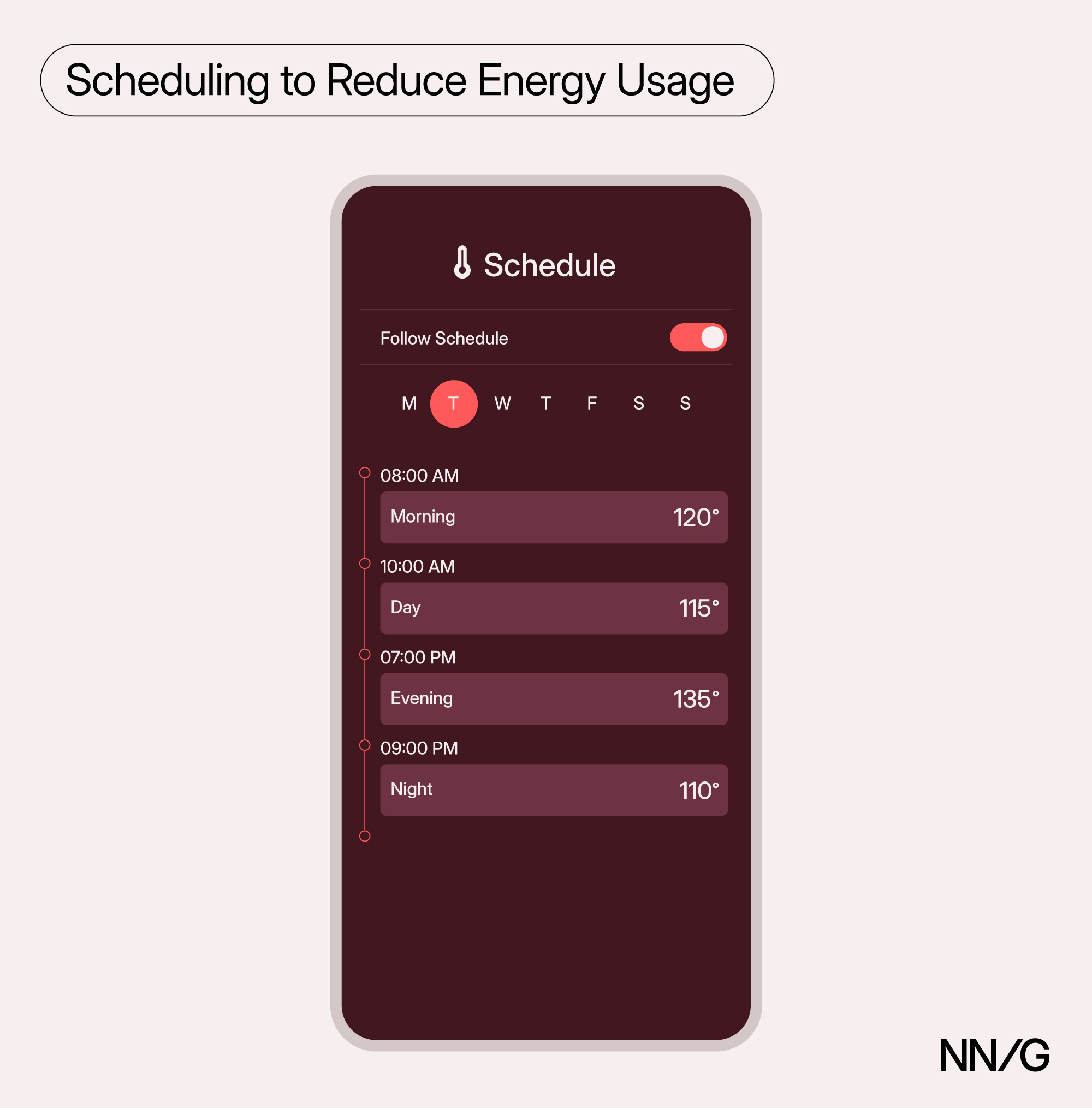
Scheduling features — commonly used for devices like thermostats, ACs, and water heaters — helped users align device behavior to their routines and reduce energy or water use during low-demand times, such as when they were away from home or asleep.
“I needed to adjust the schedule for our thermostat because we are trying to use less energy.”
4. Tracking Home Data
Smart-home devices can do more than automate tasks or reduce effort — they can also deliver valuable insights. Devices like energy monitors, HVAC systems, and even smart litter boxes collect data about the environment, device performance, or behavioral patterns. When presented clearly, this information helps users make better decisions, take timely action, and feel in control of their homes.
Understand and Act on What Matters
Information becomes valuable when it’s timely, relevant, and easy to understand. Participants in our study appreciated when their devices surfaced insights that felt personal, clear, and actionable — especially when those insights prompted decisions they wouldn’t have made otherwise.
Good Example: Smart Litter Box Detected Cat Health Issue
One participant’s smart litter box detected deviations in his cat’s weight and daily routine. The app visualized these changes clearly and sent a timely alert, prompting the participant to seek veterinary care:
“The smart litter box helped identify a serious health issue in my cat early and we were able to get him started on insulin.”
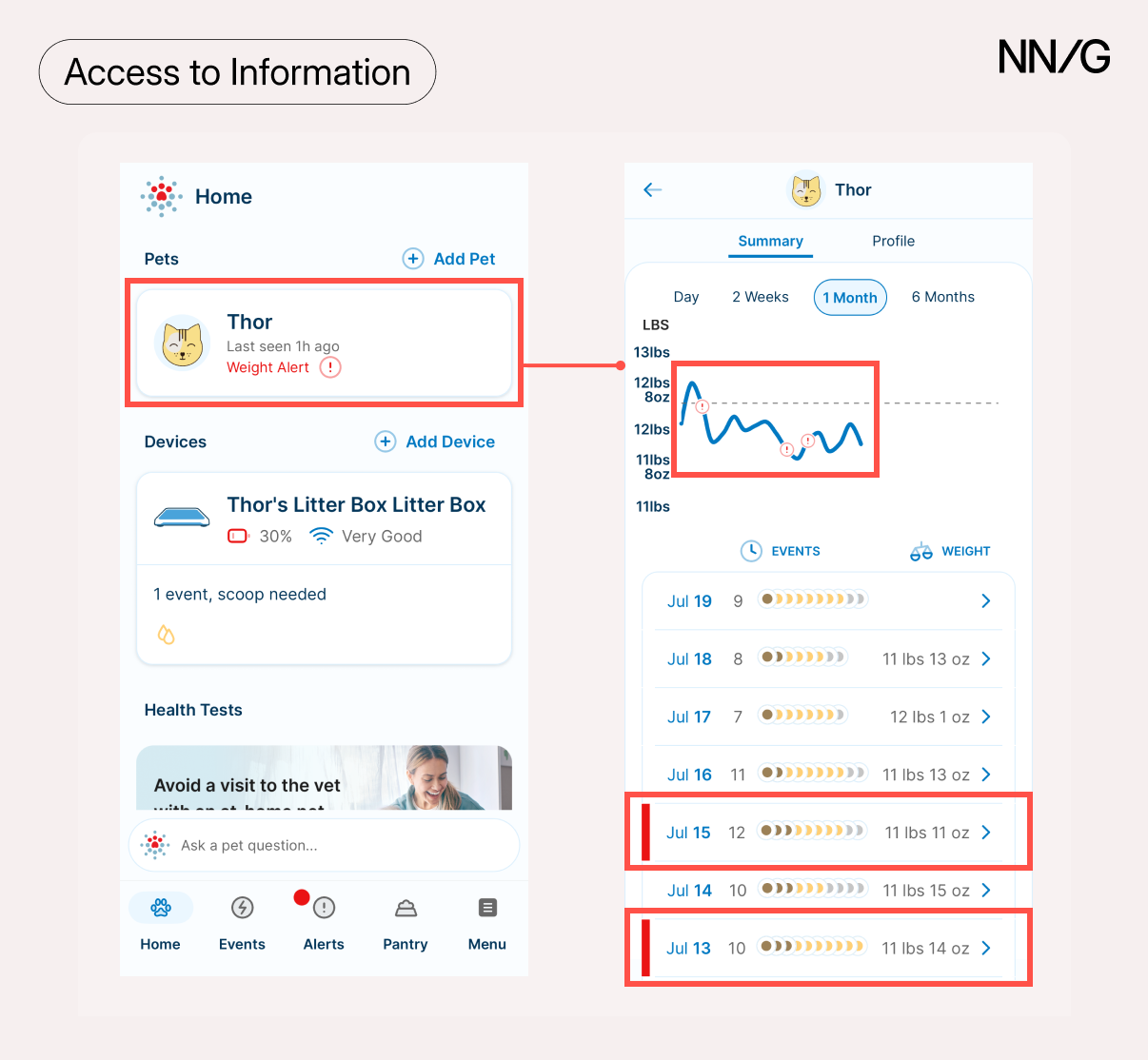
This is a strong example of what data should do:
- Highlight a meaningful change
- Explain what it could indicate
- Enable a timely response
The user didn’t have to interpret logs or complicated graphs to understand that there might be something wrong with his cat, instead the system surfaced this information automatically and at the right time.
Bad Example: Confusing Energy-Meter Data
By contrast, several participants described frustration with data that was confusing or unclear. One user shared his experience with an energy-meter app and why they hadn’t acted on the data:
“The basic things I understand, like if there’s a lot of energy being used […] But it’s more bars and levels and stuff […] [I’ve not taken any actions based on readings], because I don’t really understand all of it. What is a kilowatt? And how many of those would I normally use in a day? Or did I normally use in a day before I got this system? What is a good day in terms of how much I use?”
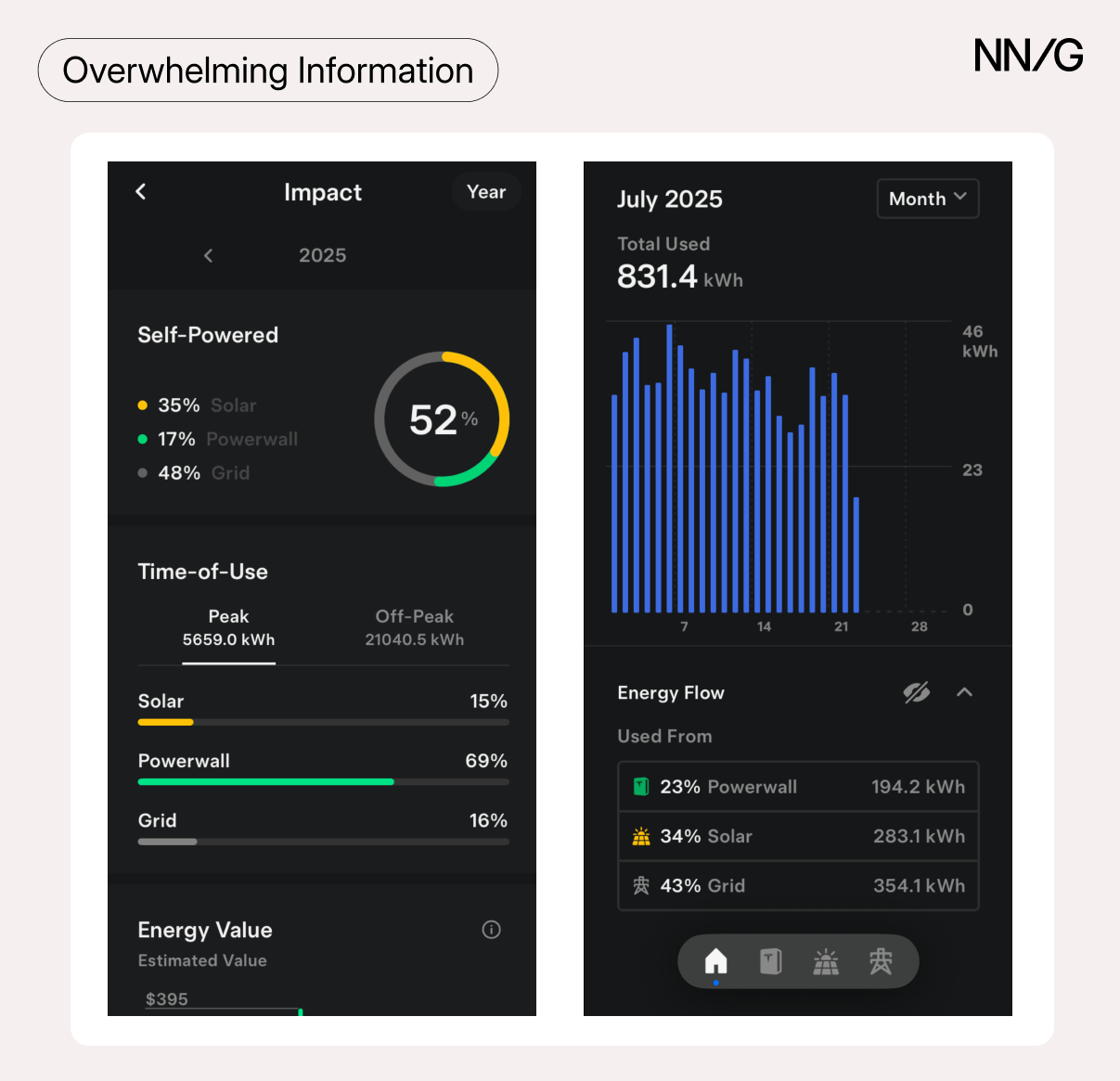
This example shows that raw data isn’t enough. Even highly motivated users won’t take action if they don’t understand what the numbers mean or how to respond. Information must be contextualized, with clear explanations, comparisons, and next steps to help users interpret and apply what they see.
5. Mood and Ambiance
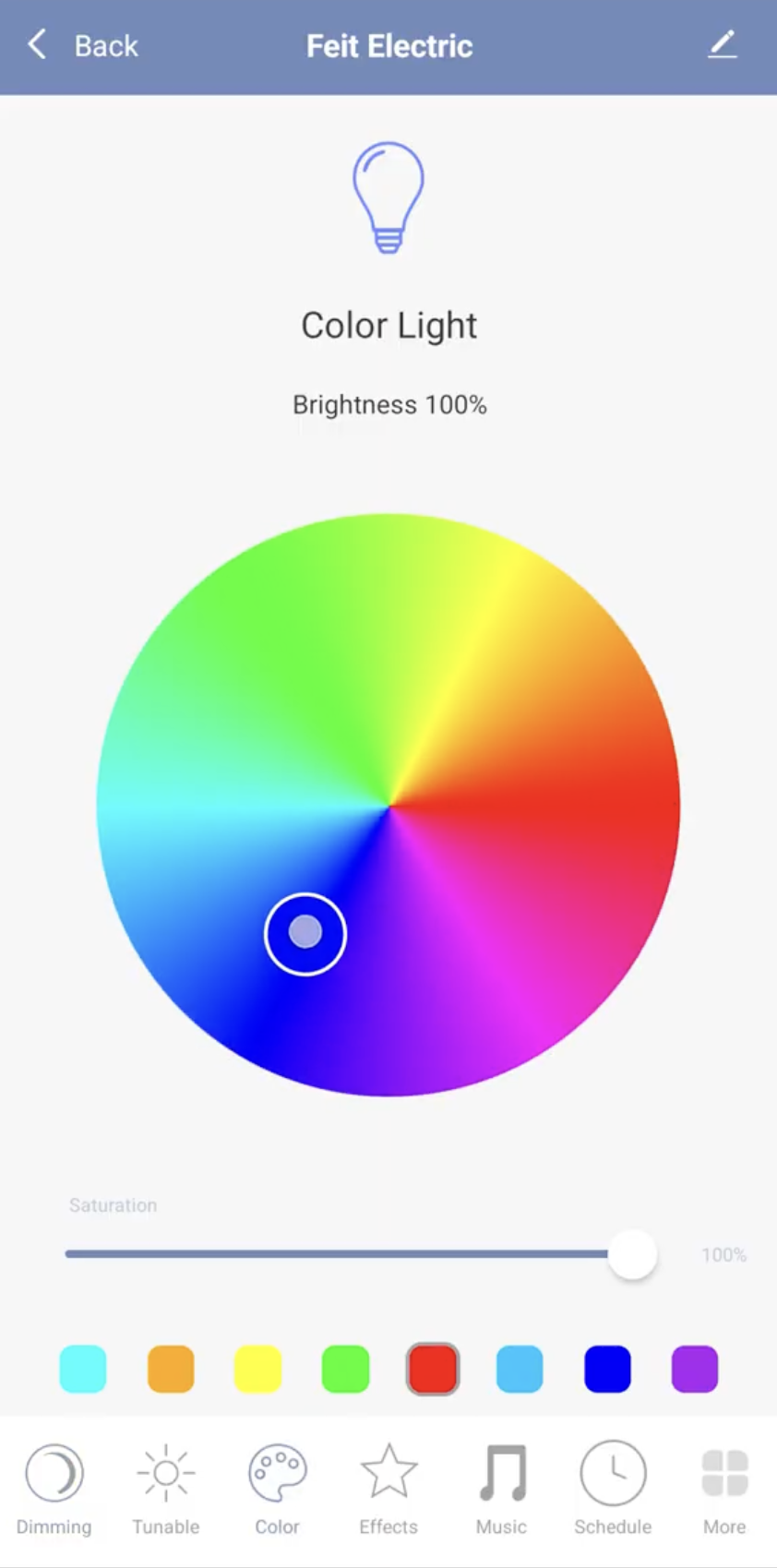
Some participants used their smart devices to shape the atmosphere of their homes and set the tone of their environments. Smart bulbs and smart speakers are some of the most common examples for this: adjusting music as well as lighting (brightness and color) let people create an environment to their liking. These ambiance features can meet emotional as well as functional needs, allowing users to feel more comfortable and at ease in their space.
“I didn’t want to just regularly have a normal light. I wanted it to be more soothing.”
Design Recommendations
Smart home adoption is driven by 5 main motivations – convenience, safety, savings, information access, and comfort through ambience. In this section, we provide recommendations for how these values can translate into practical design priorities for device apps and ecosystems.
Design Flexible, Forgiving, and Context-Aware Schedules
Automations and schedules are central to smart-home devices’ value proposition, but only when they are able to adapt to people’s lives. Users want devices that are flexible (customizable) and forgiving (easy to adjust).
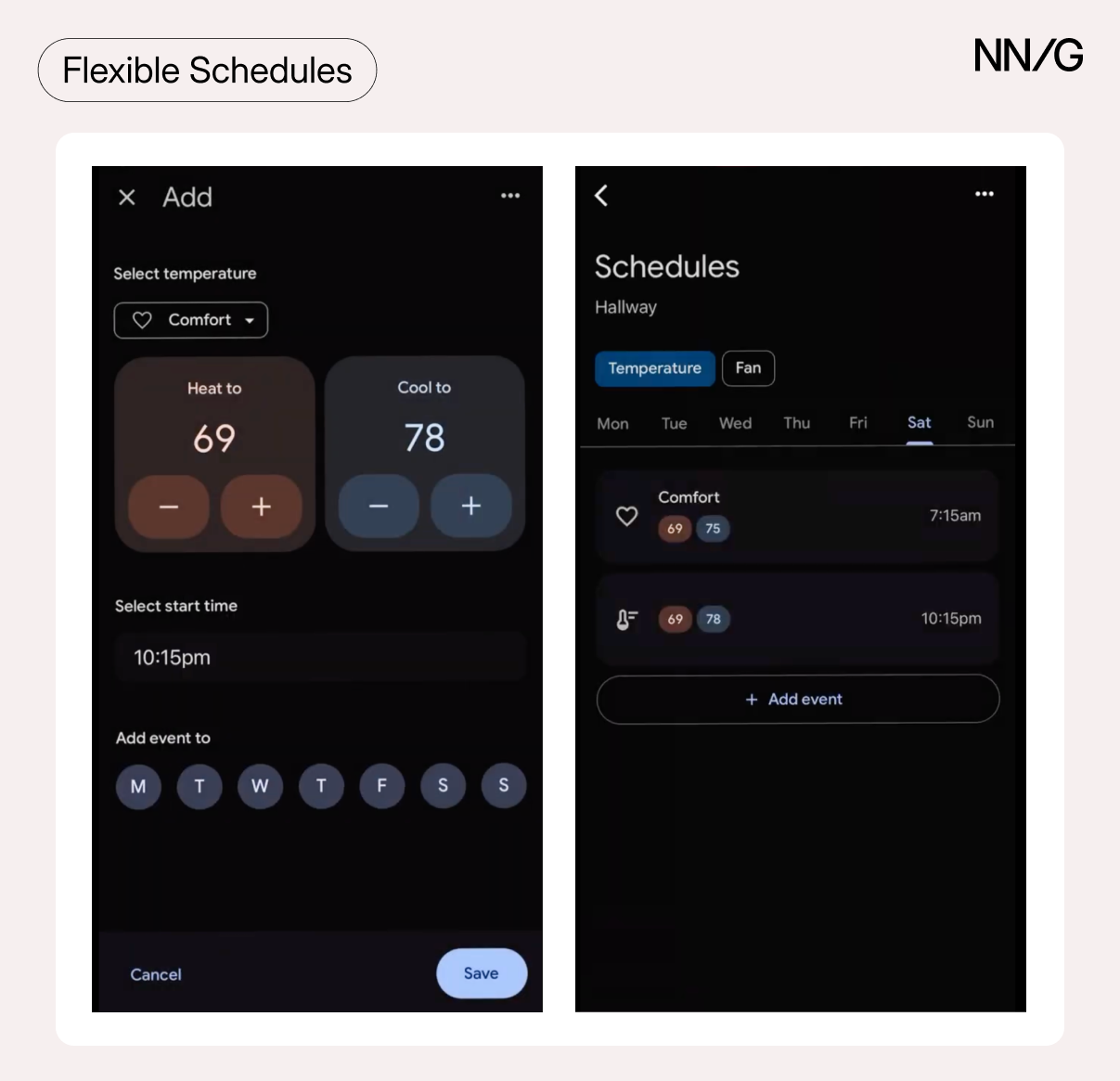
Flexible Schedules
To achieve flexibility:
- Allow users to build schedules that can be tailored to their unique routine or goals. Users should be able to choose contextual triggers, like sunrise/sunset or whether anyone is currently at home, for their schedules.
- Schedules should be easy to copy or apply across multiple days (e.g., weekends vs. weekdays).
- Provide templates and suggestions for common routines (e.g., nighttime-temperature change to help with energy saving) to streamline setup, especially for first-time users.
Forgiving Schedules
To make schedules forgiving:
- Make routines easily editable: allow pausing, skipping, reverting, or temporarily adjusting schedules without starting from scratch or permanently changing rules.
- Display clear previews of what the schedule or routine looks like and what will happen next (e.g., thermostat will lower to 68°F at 10pm).
Smart Schedule Recommendations
Multiple participants shared that they wanted their devices to learn about their preferences and suggest schedules accordingly, to help them save energy and money:
“It was great seeing that I can see history of the [water heater] and energy- saving tips once the app starts tracking it.”
Importantly, this guidance needs to be practical and relevant to people’s lives, balancing efficiency with comfort. Instead of generic suggestions, offer personalized, incremental adjustments that show clear trade-offs (e.g., “Raising your thermostat 2°F at night could save $10/month”).
To be effective, scheduling recommendations should be:
-
Realistic: Compatible with users’ daily routines and comfort needs (e.g., while keeping thermostat at a higher temperature at night may save energy, it may also cause users significant discomfort)
-
Context-aware: Informed by actual usage data and patterns (e.g., suggest when to increase water-heater temperature based on prior hot-water-usage patterns)
-
Actionable: Easy to apply, adjust, and dismiss as needed (i.e., allow quick ways for users to apply suggested routines and adjust them when circumstances change; a device-suggested schedule shouldn’t take hours to create, only for it to be scrapped soon after)
Surface Meaningful Data and Notifications that Drive Action
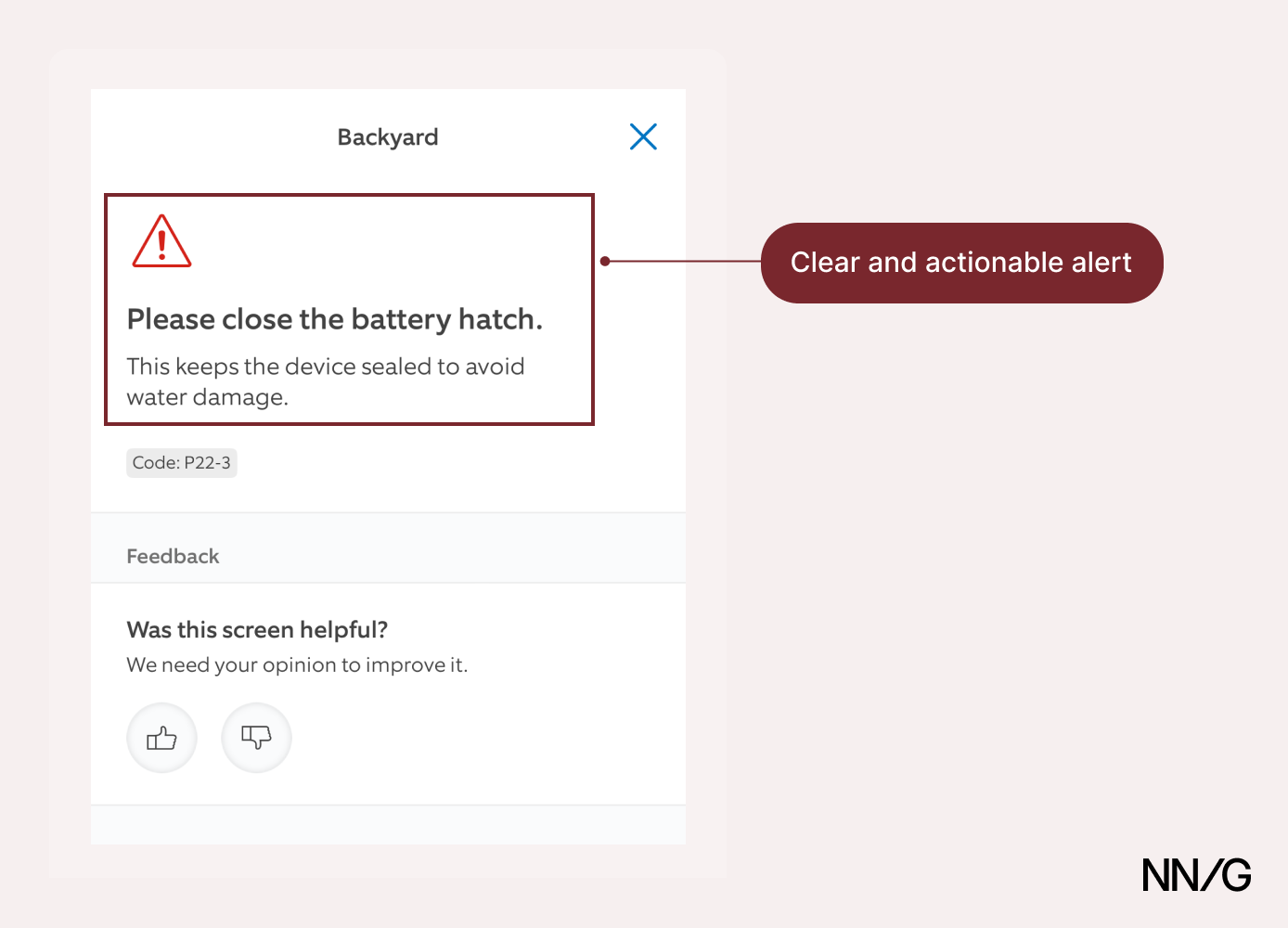
Users often rely on notifications to stay informed and take appropriate action. When not designed well, however, notifications can turn into noise and frustrate users. To ensure they are valuable to users, alerts should immediately surface:
- What’s wrong (clarity): clear explanation of the issue
- Why it matters (relevance): how it is affecting risk, cost, comfort
- What to do next (actionability): actionable steps, ideally allowing remote resolution
Align Data Presentation with Device Purpose and Context
Not all devices need deep analytics. Instead, tailor the depth and complexity of information based on the device’s role in the user’s life and the value it is meant to deliver:
- Show trends to support optimization: For devices like thermostats, energy monitors, and HVAC systems, surface usage patterns and historical trends, comparisons (e.g., energy use this month vs. this time last year or actual vs. efficient usage), inefficiencies, and optimization tips.
- Highlight anomalies to reveal behavioral or environmental changes: For devices that monitor patterns — like smart litter boxes, air-quality sensors, or leak detectors — flag deviations, provide possible causes, and suggest next steps. These insights help users notice problems they may not otherwise catch.
- Keep it simple for low-impact, real-time devices: For devices like light bulbs and smart plugs, focus on fast, reliable control. Such devices rarely have a big impact on energy usage and displaying analytics or historical data would only add clutter without much value or new insight.
For devices that do benefit from analytics, present data in progressive layers: show the most important insights in a concise summary first (e.g., “Your energy use was 15% higher than average this week”) and make more detailed data available for users who want to dig deeper. Don’t assume that raw numbers speak for themselves. Users need context to understand what the data means, why it matters, and what to do with it, so they don’t overlook or misinterpret important information.
Design for Multi-Device Orchestration
Our participants reported choosing devices based on whether they were compatible with their smart home ecosystem. This behavior suggests a desire for integrated systems that work together seamlessly. While still lacking, mainstream central hubs like Google Home, Alexa, and Apple Home have the power to synchronize devices across the home through powerful automations and cross-device communication, to further enhance the value of smart technology. Individual smart device manufacturers and central hubs should work together to achieve higher interoperability and ultimately deliver a cohesive user experience.
Importantly, users often think in experiences or overarching goals (“I want to relax after work”), not device-specific actions (“I want to turn all the lights to dim soft light, increase thermostat temperature, and play some easy music”). Smart homes should reflect that mental model by enabling users to easily control multiple devices together rather than one by one. This can be done through two complementary approaches: scenes and automations.
- Scenes are preset configurations of multiple devices that the user can trigger manually via app or voice command. Scenes are, hence, triggered or initiated by the user and are often focused on creating an ambiance or mood. For example, the user could turn on a relaxation scene that involves dimming lights, turning on music, and increasing the temperature in their house.
- Automations are conditional workflows that automatically trigger device action when specific events or conditions occur. They are often focused on ensuring convenience, safety, and/or efficiency. For example, sunset could trigger automations for lights and thermostat temperature.
Design flexible ways to organize, group, and sort devices (by function, location, frequency of use, etc.) and support scenes and automations that combine actions across device categories. For example, a “bedtime” scene that turns off lights everywhere, locks doors, and lowers thermostat temperature.
Use wizard-style flows to set up scenes and automations, with clear previews of what will happen in the chosen configuration (“All lights in the living room and kitchen will turn on” or “The fan will turn on if temperature is too high but only if there’s someone at home”). These should guide the user through a logical and simple step-by-step process, from choosing devices and triggers to adding conditions and setting the desired actions.
Allow users to blend automations and scenes, such as allowing an automation to trigger a preset scene (e.g., “at 11 pm, run ‘Bedtime’”).
Provide goal-driven automation builders that take desired outcomes as input (e.g., “Make my home safer while I’m away”) and suggest relevant automations (e.g., lock all doors, ensure all cameras are armed, etc.). These help users discover their smart home’s capabilities and support a mental model that focuses on desired experiences rather than individual device actions.
Design customizable dashboards with tiles that clearly display grouped devices and their current states. Prominently show devices and routines that are currently active (e.g., by making related tiles bigger or highlighting them). This design will provide visibility and will let users control how information is displayed and how they want to interact with their smart homes.
Conclusion
Smart-home adoption is no longer driven just by fascination with technology; it’s motivated by needs for convenience, security, comfort, resource efficiency, and a deep understanding of one’s environment.
Thoughtfully designed smart devices remove friction from daily life, provide clear visibility into device and home status, help create a comfortable environment, deliver meaningful cost insights and savings, and offer digestible and actionable insights that help decision-making.
The value of smart home technology therefore lies not in its novelty or just its technical capability; rather, it’s in its ability to integrate effortlessly into daily life and enhance both functional and emotional experiences.
Future smart-home design should focus on these core principles to create devices and ecosystems that users genuinely trust, enjoy, and continue to use long after the initial excitement wears off.